> ## Documentation Index
> Fetch the complete documentation index at: https://help.b2proxy.com/llms.txt
> Use this file to discover all available pages before exploring further.
# How to Manage Your Residential Proxy Traffic
When using residential proxies, proper traffic management can effectively prevent interruptions and overuse. B2Proxy provides simple and intuitive traffic management features, including **traffic alerts** and **usage limits**: automatic email notifications when traffic is running low, along with the ability to set traffic caps for sub-accounts. This article will help you quickly understand these features and easily control your residential proxy traffic.
## I. Overview
The traffic management feature helps you monitor and control proxy traffic usage, preventing overconsumption. It applies to both Master user and Subusers.
**Key Features**
1. Traffic Reminder: Email notifications when balance is low.
2. Usage Limits: Set traffic caps for sub-users.
## II. Setup Steps
Log in to your B2Proxy dashboard, navigate to 「Residential Proxies」.
### 1. Traffic Reminder
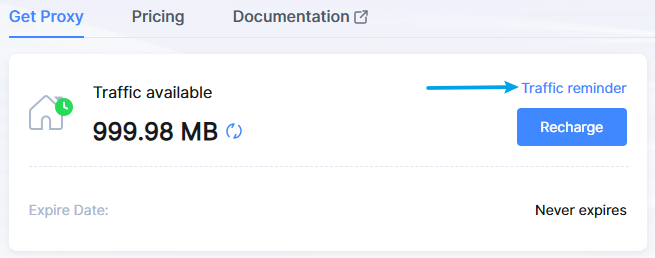
Purpose: Receive email warnings when traffic falls below a set threshold.
 **Setup:**
In the "Traffic left" field, enter the threshold (e.g., 10GB).\
Ensure the status is set to "Enable", then click "Confirm" to save the settings.
### 2. Usage Limits
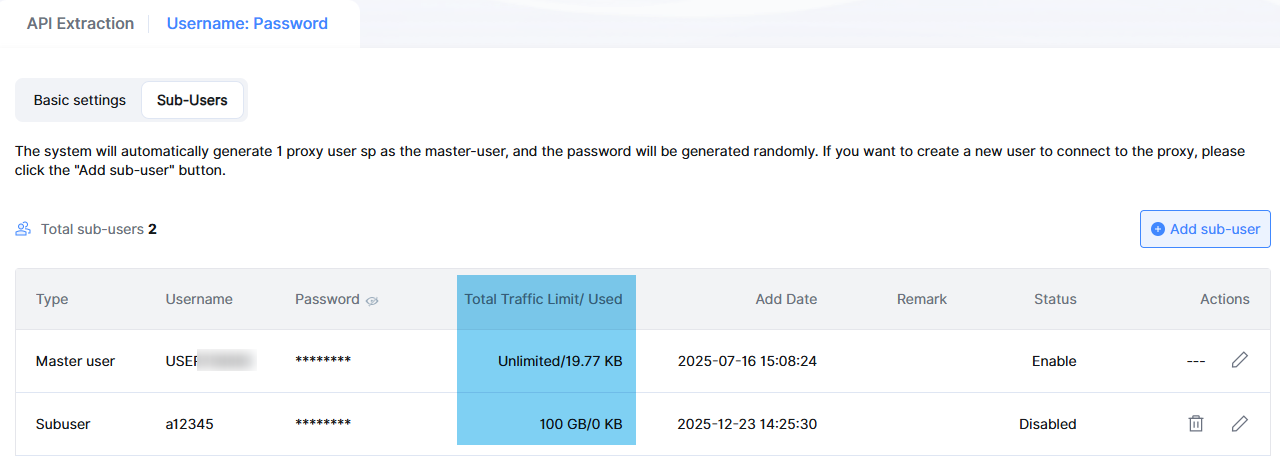
Purpose: To limit traffic consumption of sub-users and prevent overages.
**Setup:**
In the "Traffic left" field, enter the threshold (e.g., 10GB).\
Ensure the status is set to "Enable", then click "Confirm" to save the settings.
### 2. Usage Limits
Purpose: To limit traffic consumption of sub-users and prevent overages.
 **Setup:**
In the "Sub-user" traffic limit field, enter a value (e.g., 5GB). (Unit options: GB/MB/KB)
Click "Confirm" to save the settings.
Tips: Alert Threshold: Recommended at 10–20% of total traffic (e.g., 10–20GB for a 100GB plan).
**Setup:**
In the "Sub-user" traffic limit field, enter a value (e.g., 5GB). (Unit options: GB/MB/KB)
Click "Confirm" to save the settings.
Tips: Alert Threshold: Recommended at 10–20% of total traffic (e.g., 10–20GB for a 100GB plan).